

An anticipated subject since Gautam Gambhir’s appointment as India’s head coach has been the likely equation the two-time World Cup winner would share with his former teammates, Rohit Sharma and Virat Kohli.
Gambhir offered some thoughts during his first press conference in his new role. “They have shown what they can deliver on the big stage. Whether it is the T20 World Cup or the ODI World Cup. Both of them have a lot more cricket left in them. We’ve got the Champions Trophy, a tour of Australia, so they will be motivated. If they keep their fitness then even the 2027 World Cup. To answer how much cricket is left in them is difficult. Any team that has players of their class would love to have them for as long as possible,” the 42-year-old told reporters in Mumbai last week.

The thirties can put players in a constant flux where form and batsmanship can touch and transcend extremes. The highs may be fleeting and the lows can sometimes be persistent.
It seemed like Sachin Tendulkar could go on forever when he plundered over 4000 runs in Tests and ODIs between 2008 – the year he turned 35 – and 2011 with a record 19 centuries. And when the rigours finally caught up with him, the descent was swift between 2012 and 2013 when he managed only 948 runs in 36 innings with a solitary ton – his 100th international century. The late thirties were not kind to Ricky Ponting and Vivian Richards either. Meanwhile, some others like Kumar Sangakkara, Matthew Hayden and Michael Hussey remained solid throughout the 30s.
| Batters to record 10000+ runs in both pre-30s and post-30s | |||||||
| Pre-30 | |||||||
| Player | Span | Inns | Runs | HS | Ave | 100 | 50 |
| Sachin Tendulkar | 1989-2003 | 474 | 21030 | 217 | 49.13 | 65 | 97 |
| Jacques Kallis | 1995-2005 | 368 | 15123 | 189* | 49.74 | 35 | 90 |
| Ricky Ponting | 1995-2004 | 338 | 13799 | 257 | 46.61 | 35 | 66 |
| Mahela Jayawardena | 1997-2007 | 376 | 13195 | 374 | 38.92 | 25 | 69 |
| Rahul Dravid | 1996-2003 | 296 | 11762 | 217 | 44.55 | 22 | 70 |
| Kumar Sangakkara | 2000-2007 | 309 | 11647 | 287 | 42.04 | 20 | 63 |
| Brian Lara | 1990-1999 | 247 | 11034 | 375 | 48.18 | 25 | 64 |
| Inzamam-ul-Haq | 1991-2000 | 297 | 10353 | 200* | 39.66 | 14 | 70 |
| Post-30 | |||||||
| Kumar Sangakkara | 2007-2015 | 357 | 16369 | 319 | 50.83 | 43 | 90 |
| Ricky Ponting | 2004-2012 | 330 | 13684 | 221 | 45.31 | 36 | 80 |
| Sachin Tendulkar | 2003-2013 | 308 | 13327 | 248* | 47.59 | 35 | 67 |
| Mahela Jayawardena | 2007-2015 | 349 | 12762 | 275 | 39.38 | 29 | 67 |
| Rahul Dravid | 2003-2012 | 309 | 12446 | 270 | 46.26 | 26 | 76 |
| Brian Lara | 1999-2007 | 274 | 11324 | 400* | 44.58 | 28 | 47 |
| Jacques Kallis | 2005-2014 | 249 | 10411 | 224 | 48.19 | 27 | 59 |
| Inzamam-ul-Haq (Asia/ICC/PAK) | 2000-2007 | 254 | 10227 | 329 | 47.78 | 21 | 59 |
Rohit, Kohli and the mid-30s test
Sunil Gavaskar remains India’s oldest player in a World Cup match, aged 38y 111d during his final appearance in 1987. Tendulkar, Dhoni, R Ashwin and Farokh Engineer are the other players to cross 37 while playing in the quadrennial event.

Kohli, 35, has entered the testing phase after enduring a torrid stretch between 2020 and 2022 where he went 1021 days without an international hundred. Rohit, the current ODI and Test captain, will be running 40 during the next World Cup, slated to be held in Africa in October-November 2027.
The senior duo have not exhibited any discernible downslide in their batsmanship in the longer formats. In fact, Kohli and Rohit finished as the highest run-getters in the ODI World Cup last year, recording 765 and 597 runs respectively. They were also in their element during crucial passages of India’s T20 World Cup win in the Americas.
However, Rohit and Kohli have charted interesting career paths since their debuts in 2007 and 2008 respectively.
| Supersonic starts: Most runs before turning 30 | |||||||
| Player | Span | Inns | Runs | Ave | 100 | 50 | % of career runs |
| Sachin Tendulkar | 1989-2003 | 474 | 21030 | 49.13 | 65 | 97 | 61.21% |
| Virat Kohli | 2008-2018 | 390 | 18665 | 56.56 | 62 | 85 | 69.42% |
| Jacques Kallis | 1995-2005 | 368 | 15123 | 49.74 | 35 | 90 | 59.22% |
| Joe Root | 2012-2020 | 347 | 14678 | 47.81 | 33 | 87 | 75.83% |
| Graeme Smith | 2002-2011 | 353 | 14512 | 43.71 | 30 | 77 | 84.19% |
30s: Not everyone’s cup of tea
Only an elite club of cricketers have coupled consistency with longevity across two distinct phases – pre and post-30s – in their respective careers. Eight cricketers have amassed over 10,000 runs in both phases, a pantheon of the very best comprising Tendulkar, Sangakkara, Ponting, Brian Lara, Mahela Jayawardena, Inzamam-ul-Haq, Jacques Kallis and Rahul Dravid. Relaxing the cut-offs to 9000s in both periods will include Shivnarine Chanderpaul, David Warner and Hashim Amla.
However, these are not the only metrics of age-defying success in international cricket. Players such as Hayden, Michael Hussey, Misbah-ul-Haq and Tillakaratne Dilshan nearly aggregated their entire career runs in the 30s; scoring 10,000 runs or more in the phase.
| Late Bloomers: Scoring 10,000+ runs in only post-30 phase | ||||
| Player | Span | Inns | Runs | % of career runs |
| T Dilshan | 2006-2016 | 379 | 13712 | 77.50% |
| Sanath Jayasuriya | 1999-2011 | 412 | 13666 | 64.97% |
| Matthew Hayden | 2001-2009 | 287 | 12959 | 86.01% |
| Michael Hussey | 2005-2013 | 319 | 12253 | 98.80% |
| Rohit Sharma | 2017-present | 268 | 11398 | 59.74% |
| Shivnarine Chanderpaul | 2004-2015 | 275 | 11338 | 54.02% |
| M Hafeez | 2010-2021 | 341 | 10827 | 84.71% |
| Misbah-ul-Haq | 2004-2017 | 296 | 10730 | 96.38% |
| Mark Waugh | 1995-2002 | 276 | 10570 | 63.94% |
| Alec Stewart | 1993-2003 | 306 | 10253 | 78.02% |
| Steve Waugh | 1995-2004 | 266 | 10204 | 55.16% |
| Adam Gilchrist | 2001-2008 | 282 | 10141 | 65.59% |
Rohit finds himself among this rare crop of batters who have remarkably enhanced their run aggregates during their 30s. Debuting at 20, Rohit stacked up 7679 runs in 238 innings between 2007 and 2017, averaging 38.58 with 13 centuries and 47 fifties.
The Mumbaikar underwent a tremendous transformation since his 30th birthday, piling up 11,398 runs in 268 innings with an average exceeding 47. Rohit has smashed 35 centuries in this period, level with Tendulkar, and only bettered by Sangakkara (43), Ponting and Hayden (36).
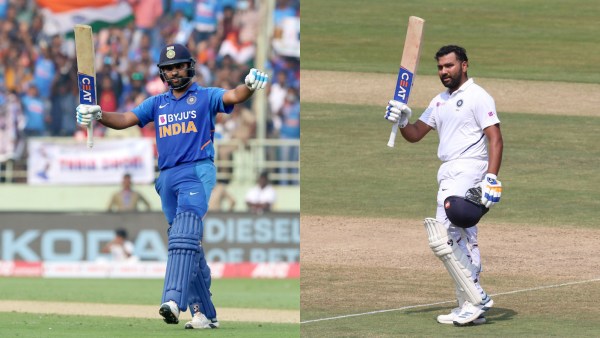 Rohit has slammed 35 hundreds across formats since turning 30 in 2017. (Sportzpics)
Sangakkara and Tendulkar, beacons of cricket’s veteran club, had runs steaming off their bat even after crossing 35 in their careers, registering more than 6000 runs and 19 centuries apiece – a joint record. Two years in, the 37-year-old Rohit has scored 3344 runs in 89 innings with seven tons and a 40-plus average. Rohit, like Kohli, endured a lull during the COVID-stricken period between 2020-2022, with only three centuries in 82 innings.
| Pre-30 | |||||||
| Player | Span | Inns | Runs | HS | Ave | 100 | 50 |
| Virat Kohli | 2008-2018 | 390 | 18665 | 243 | 56.66 | 62 | 85 |
| Rohit Sharma | 2007-2017 | 238 | 7679 | 264 | 38.58 | 13 | 47 |
| Post-30 | |||||||
| Player | Span | Inns | Runs | HS | Ave | 100 | 50 |
| Rohit Sharma | 2017-present | 268 | 11398 | 212 | 47.09 | 35 | 57 |
| Virat Kohli | 2018-present | 198 | 8219 | 254* | 47.78 | 18 | 55 |
On the other hand, Kohli’s 8219 runs since turning 30 in November 2018 represent a considerable dip when placed alongside his younger self, the Kohli of 20s, who racked up a staggering 18665 runs with 62 hundreds and a 56-plus average. Even as he has fallen short of the incredible standards he had set in the last decade, Kohli (8219) still ranks second in terms of runs since his 30th birthday, with Babar Azam (9865) topping the charts and Rohit (8012) completing the top three.
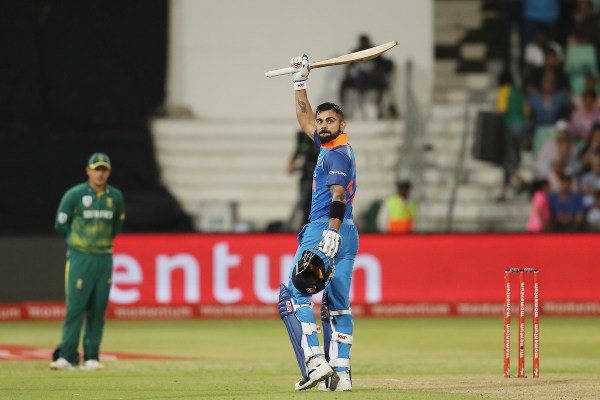 Kohli piled up 62 international centuries in his 20s.
SPORTZPICS
Even as Rohit’s elevated levels have made him an indispensable member of the side across formats, Kohli still leads the charts for India since 2020 with 5440 runs as opposed to the former’s 5359.
While maintaining the same rates of run-making would be Kohli’s primary challenge, fitness is likely the only concern for Rohit, for now. In Gambhir’s words, should the pair “keep their fitness”, Rohit and Kohli will likely set a new benchmark for cricketing longevity as the oldest players to represent India in a World Cup in 2027.
[ad_2]
Source link




Leave a Reply