Let’s be honest—income tax preparation often feels like solving a puzzle with missing pieces. You sit with salary slips, allowances, exemptions, and forms, and yet something always feels incomplete. However, what if one Excel file could do it all for you—smoothly, accurately, and automatically? That is exactly what All in One Tax Preparation Software in Excel promises.
This article explains how you can download and prepare at a time an automatic income tax computed sheet with a unique salary structure, automatic HRA calculation u/s 10(13A), automatic arrears relief calculation u/s 89(1) with Form 10E, and automatic Form 16 Part A & B for both Government and Non-Government employees for FY 2025-26.
Think of it like a Swiss Army knife for tax—compact, reliable, and ready for every situation. So, why struggle manually when automation can work like a silent assistant beside you?
Table of Contents
| Sr# | Headings |
| 1 | Understanding All-in-One Tax Preparation Software in Excel |
| 2 | Why FY 2025-26 Tax Planning Needs Automation |
| 3 | Unique Salary Structure Explained |
| 4 | Automatic Income Tax Computation in Excel |
| 5 | Automatic HRA Calculation u/s 10(13A) |
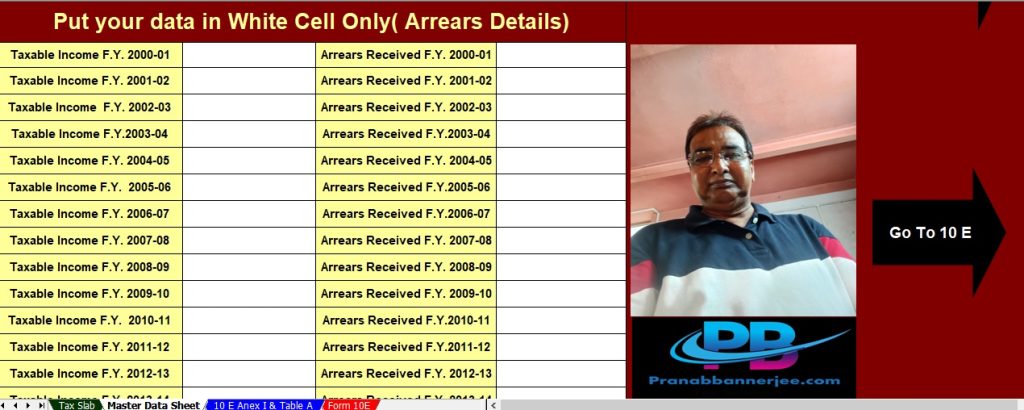
| 6 | Automatic Income Tax Arrears Relief u/s 89(1) |
| 7 | Auto-Generated Form 10E without Errors |
| 8 | Automatic Form 16 Part A & B |
| 9 | Automatic Form 16 Part B – Salary Breakup |
| 10 | Benefits for Government Employees |
| 11 | Benefits for Non-Government Employees |
| 12 | Old vs New Tax Regime Comparison |
| 13 | Accuracy, Compliance, and Time Saving |
| 14 | Who Should Use This Excel Utility |
| 15 | How to Download and Use the Excel Sheet |
1. Understanding All-in-One Tax Preparation Software in Excel
Firstly, the All-in-One Tax Preparation Software in Excel goes far beyond a simple calculator. Instead, it actively functions as a complete and integrated tax ecosystem. It not only calculates income tax but also compares options, summarises results, and presents all tax-related data clearly in one place. Moreover, it updates every value automatically as soon as you enter salary details.
In other words, rather than juggling multiple files, switching between sheets, or repeating data entry, you manage everything efficiently inside one single Excel workbook. Consequently, tax preparation becomes organised, structured, and stress-free.
2. Why FY 2025-26 Tax Planning Needs Automation
Every year, tax rules evolve, slabs change, and compliance requirements become stricter. Therefore, manual tax preparation often results in errors. Additionally, such errors lead to confusion, stress, notices, and unnecessary delays.
Automation, however, ensures consistency at every step. Furthermore, it saves time. Moreover, it reduces dependency on manual calculations. Consequently, it improves overall accuracy. As a result, FY 2025-26 tax planning becomes simpler, faster, safer, and more reliable.
3. Unique Salary Structure Explained
A unique salary structure allows the Excel sheet to adapt smoothly to different pay components. For example, it separately manages basic pay, DA, HRA, TA, arrears, incentives, and deductions.
Moreover, it aligns perfectly with Government pay rules as well as Non-Government CTC formats. Hence, regardless of whether you work in the public sector or the private sector, the structure fits naturally and works seamlessly.
4. Automatic Income Tax Computation in Excel
Once you enter salary details, the software immediately computes taxable income. Then, it applies eligible deductions. After that, it calculates the final tax liability automatically.
Because formulas operate silently in the background, you avoid calculation mistakes. Additionally, whenever figures change, the sheet updates instantly. Consequently, accuracy remains intact at all times.
5. Automatic HRA Calculation u/s 10(13A)
HRA calculation often confuses taxpayers. However, this Excel utility simplifies the entire process. It automatically considers salary components, rent paid, and metro or non-metro status.
As a result, the exemption under section 10(13A) appears instantly. Therefore, you no longer need manual formulas, repeated checks, or guesswork.
6. Automatic Income Tax Arrears Relief u/s 89(1)
Arrears can suddenly increase your tax burden. Therefore, relief under section 89(1) becomes essential.
This software calculates arrears relief automatically. Moreover, it compares tax across relevant financial years. Consequently, it ensures the maximum eligible relief without errors or omissions.
7. Auto-Generated Form 10E without Errors
Form 10E remains mandatory for claiming relief u/s 89(1). However, manual preparation often proves risky.
Thankfully, this Excel tool generates Form 10E automatically. Hence, you avoid mismatches, missing data, and compliance issues. As a result, filing becomes smooth and hassle-free.
8. Automatic Form 16 Part A & B
Form 16 acts as the backbone of salary tax compliance. This Excel utility actively prepares both parts:
- Form 16 Part A for TDS details
- Form 16 Part B for salary computation
Moreover, it strictly follows the latest format prescribed for FY 2025-26. Consequently, accuracy and compliance remain assured.
9. Automatic Form 16 Part B – Salary Breakup
Form 16 Part B clearly explains salary income. Therefore, precision becomes critical.
The Excel sheet provides a detailed salary breakup, lists exemptions and deductions, and summarises tax calculations. As a result, employees clearly understand how their tax is calculated.
10. Benefits for Government Employees
Government employees benefit significantly because the tool supports the pay matrix, calculates DA and arrears automatically, and prepares Form 16 matching official records.
Thus, compliance becomes simple, smooth, and stress-free.
11. Benefits for Non-Government Employees
Similarly, private-sector employees enjoy flexibility. The tool supports variable salary structures, incentives, bonuses, and multiple employers. Hence, it adapts effortlessly to corporate environments.
12. Old vs New Tax Regime Comparison
Choosing the right tax regime matters greatly. Therefore, the Excel utility automatically compares the old regime with deductions and the new regime with lower slabs.
As a result, you instantly select the most tax-efficient option without confusion.
13. Accuracy, Compliance, and Time Saving
Accuracy builds confidence. Compliance avoids penalties. Time saving boosts productivity.
Because this software integrates all calculations into one system, you achieve all three goals simultaneously.
14. Who Should Use This Excel Utility
This Excel utility suits salaried individuals, accountants, Drawing and Disbursing Officers, and tax consultants.
In short, anyone who deals with salary-based taxation should use it confidently.
15. How to Download and Use the Excel Sheet
Downloading the Excel file is simple. After opening it, you enter salary details, select the tax regime, review auto-calculations, and print Form 16 and Form 10E.
Thus, tax preparation finishes smoothly and efficiently.
Conclusion
Tax preparation does not need to feel like climbing a mountain. Instead, with All-in-One Tax Preparation Software in Excel, you follow a clear and guided path. From automatic income tax computation to HRA calculation, from arrears relief u/s 89(1) to Form 16 Part A and Part B, everything works together seamlessly.
So, why waste time on manual work when one Excel file can do it all—accurately, efficiently, and confidently—for FY 2025-26?
Frequently Asked Questions (FAQs)
- Is this Excel utility suitable for both Govt and Non-Govt employees?
Yes, it fully supports both Government and Non-Government salary structures. - Does the software calculate HRA exemption automatically u/s 10(13A)?
Yes, it calculates the HRA exemption automatically based on the entered details. - Can I generate Form 10E automatically using this Excel sheet?
Absolutely, the software auto-generates Form 10E for arrears relief. - Does it compare the old and new tax regimes?
Yes, it automatically compares both regimes to help you choose wisely. - Is the All-in-One Tax Preparation Software in Excel useful for FY 2025-26 compliance?
Yes, it is fully optimised for FY 2025-26 tax rules and formats.
Download and Prepare an Automatic Income Tax Computed Sheet for FY 2025-26



🌟 Special Features of this Excel Utility are:-
The All-in-One Tax Preparation Software in Excel stands out because it combines simplicity, automation, and compliance in one powerful tool. Below are the special features, explained clearly and written in active voice, so anyone can understand and trust the system.
1. One-Time Data Entry, Multiple Outputs
Firstly, you enter salary details only once. Then, the software automatically prepares the income tax computation, Form 16, and Form 10E together. As a result, you avoid repetitive work and save valuable time.
2. Unique and Flexible Salary Structure
Secondly, the Excel utility supports a unique salary structure. It smartly adjusts to Government pay matrices as well as Non-Government CTC formats. Therefore, it fits every type of salaried employee without modification.
3. Fully Automatic Income Tax Calculation
Moreover, the software calculates income tax automatically the moment you input salary data. Consequently, it removes manual errors and ensures accurate tax liability for FY 2025-26.
4. Automatic HRA Calculation u/s 10(13A)
In addition, the tool computes the House Rent Allowance (HRA) exemption automatically. It considers salary, rent paid, and metro status. Hence, you always receive the maximum eligible HRA exemption without confusion.
5. Automatic Arrears Relief Calculation u/s 89(1)
Furthermore, if you receive arrears, the Excel sheet instantly calculates tax relief u/s 89(1). As a result, it reduces the extra tax burden and ensures lawful savings.
6. Error-Free Auto-Generation of Form 10E
Equally important, the software prepares Form 10E automatically. Therefore, you do not worry about mismatches, incomplete data, or rejection during filing.
7. Automatic Form 16 Part A & Part B
Additionally, the tool generates Form 16 Part A and Part B in the correct format. Consequently, it ensures smooth compliance with salary TDS reporting requirements.
8. Detailed Form 16 Part B with Salary Breakup
Not only that, Form 16 Part B shows a clear salary breakup, exemptions, deductions, and tax calculation. Thus, employees easily understand how their tax is computed.
9. Old vs New Tax Regime Comparison
Meanwhile, the Excel utility compares the Old and New Tax Regimes automatically. Hence, you can instantly choose the most beneficial option and reduce tax legally.
10. Suitable for Both Govt & Non-Govt Employees
Importantly, the software works perfectly for Government and Non-Government employees alike. Therefore, organisations can rely on a single Excel solution for all staff.
11. Built-in Accuracy and Compliance
As accuracy matters most, the formulas follow the latest income tax rules for FY 2025-26. Consequently, compliance improves, and the risk of notices reduces significantly.
12. Time-Saving and User-Friendly Design
Finally, the Excel sheet uses a simple, user-friendly layout. Even non-technical users can operate it easily. As a result, tax preparation becomes fast, stress-free, and reliable.
⭐ Why This Feature Set Matters
Just like an autopilot in an aircraft, this Excel utility handles complex calculations silently while you stay in control. Therefore, with All-in-One Tax Preparation Software in Excel, you gain confidence, clarity, and compliance—all in one place.