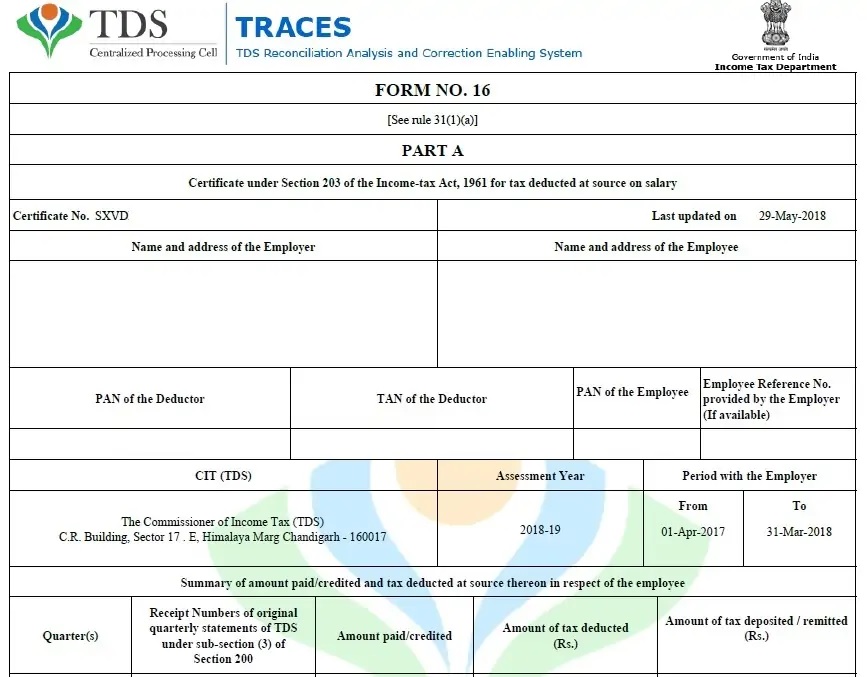


When tax season arrives, many employers and accountants feel the pressure instantly. After all, preparing salary details, deductions, and tax calculations manually can feel like carrying water in a leaking bucket. However, things change completely when you download Excel Form 16 Part B 2025-26, especially when it allows you to prepare Form 16 Part B for 50 employees at once. In simple words, this Excel utility acts like a smart assistant—fast, reliable, and always ready. So, why struggle with repetitive work when automation can save time, effort, and stress?
Table of Contents
| Sr# | Headings |
| 1 | What Is Form 16 Part B? |
| 2 | Why Form 16 Part B Is Important |
| 3 | Why Choose Form 16 Part B in Excel |
| 4 | Overview of Excel Form 16 Part B 2025-26 |
| 5 | Prepare 50 Employees at Once – How It Works |
| 6 | Key Features of the Excel Utility |
| 7 | Accuracy and Error Reduction |
| 8 | Time-Saving Benefits for Employers |
| 9 | Benefits for Employees |
| 10 | Compliance with FY 2025-26 Rules |
| 11 | User-Friendly Design |
| 12 | Who Can Use This Excel Tool |
| 13 | Step-by-Step Preparation Process |
| 14 | Common Mistakes This Tool Avoids |
| 15 | Final Thoughts on Using Excel Form 16 Part B |
1. What Is Form 16 Part B? – A Clear Explanation
To begin with, Form 16 Part B works as a detailed statement of salary paid and tax deducted at source by the employer. In other words, it presents a complete breakup of salary income in a structured manner. Moreover, it clearly highlights exemptions, deductions under Chapter VI-A, and the final taxable income. In addition, it explains how the employer calculates tax step by step. As a result, employees gain clarity and confidence. Therefore, Form 16 Part B becomes an essential document for filing income tax returns smoothly and correctly.
2. Why Form 16 Part B Is Important for Tax Filing
First of all, Form 16 Part B ensures transparency between the employer and the employee. Secondly, it serves as official proof of tax deduction at source. Thirdly, it simplifies the income tax return filing process. Additionally, it helps avoid confusion during scrutiny or assessment. Furthermore, it supports accurate self-assessment. Consequently, both employers and employees rely on Form 16 Part B every year without exception.
3. Why Choose Form 16 Part B in Excel
Undoubtedly, Excel remains one of the most widely used tools worldwide. Therefore, Form 16 Part B in Excel becomes the most practical option. Moreover, Excel supports automation, formulas, and bulk processing. As a result, handling large employee data becomes effortless. Besides that, Excel works offline, which adds flexibility. Not only that, but it also allows easy editing and customisation. Hence, Excel proves to be both powerful and convenient.
4. Overview of Excel Form 16 Part B 2025-26 Utility
Specifically designed for the current year, the Excel Form 16 Part B 2025-26 utility aligns with updated tax slabs and rules. Importantly, it follows the latest income tax provisions. Likewise, it supports structured and systematic data entry. Furthermore, it ensures accuracy and consistency. Thus, it becomes a complete tax preparation solution rather than just a basic template.
5. Prepare 50 Employees at Once – How the Excel Utility Works
Instead of preparing Form 16 individually, this Excel utility allows batch processing. Simply put, you enter the employer and employee details once. Then, the Excel file automatically calculates salary, deductions, and tax for up to 50 employees at once. Consequently, repetitive work disappears. As a result, productivity increases significantly while effort reduces.
6. Key Features of the Excel Form 16 Part B Utility
Major Highlights
- Bulk preparation for up to 50 employees
- Automatic tax and salary calculation
- Predefined and compliant formats
- Editable and customizable fields
- Instant print-ready Form 16 Part B
Moreover, these features work together seamlessly. Therefore, the entire preparation process becomes smooth, fast, and reliable.
7. Accuracy and Error Reduction with Automation
Manual calculations often lead to mistakes. However, automated Excel formulas minimise human error. Additionally, built-in checks maintain consistency across all employees. Consequently, accuracy improves dramatically. In other words, Excel behaves like a calculator that never gets tired or distracted.
8. Time-Saving Benefits for Employers
Time is money, isn’t it? With this Excel utility, employers save hours and sometimes even days. Instead of spending time on calculations, they can focus on planning and decision-making. As a result, the workload reduces. Meanwhile, efficiency improves. Ultimately, deadlines become easier to meet.
9. Clear Benefits for Employees
Employees receive a well-structured and easy-to-understand Form 16 Part B in Excel. Consequently, they understand their salary structure better. Moreover, they can file income tax returns independently. As a result, dependency on third parties reduces. Thus, trust between employer and employee strengthens.
10. Compliance with FY 2025-26 Tax Rules
Staying compliant is critical. Thankfully, this Excel utility strictly follows FY 2025-26 income tax rules. Therefore, it supports correct exemptions, deductions, and calculations. In turn, it reduces the risk of notices, penalties, or mismatches.
11. User-Friendly Design for Everyone
The interface remains simple and intuitive. Even beginners can use it comfortably. Furthermore, clear labels and step-by-step instructions guide users throughout the process. Hence, no advanced Excel knowledge is required at all.
12. Who Can Use This Excel Tool Effectively
This Excel utility is ideal for:
- Small and medium businesses
- Accountants and tax consultants
- HR and payroll professionals
- Educational institutions
In short, anyone responsible for preparing Form 16 can benefit greatly.
13. Step-by-Step Form 16 Part B Preparation Process
Firstly, enter the employer details.
Secondly, add employee information.
Then, input salary components.
Next, include deductions and exemptions.
Finally, review the data and print Form 16 Part B.
As you can see, the workflow remains logical, smooth, and efficient.
14. Common Mistakes This Excel Tool Helps Avoid
Often, people forget deductions or miscalculate taxable income. However, this Excel utility prevents such issues. Additionally, it ensures uniform formatting for all employees. Consequently, errors reduce significantly, and consistency improves.
15. Final Thoughts on Using Excel Form 16 Part B
To sum up, downloading Excel Form 16 Part B 2025-26 feels like upgrading from a bicycle to a car. It moves faster, carries more, and saves energy. Therefore, if you manage multiple employees, this tool is not a luxury—it is a necessity.
Conclusion – Make Tax Compliance Simple and Stress-Free
In conclusion, Form 16 Part B in Excel delivers simplicity, speed, and accuracy. Whether you handle 5 employees or 50, this Excel utility removes stress from tax compliance. Ultimately, it transforms a complex task into a smooth routine. So, why wait? Embrace automation and make every tax season easier.
Frequently Asked Questions (FAQs)
- Can I prepare Form 16 Part B for 50 employees at once using Excel?
Yes, this Excel utility allows bulk preparation for up to 50 employees simultaneously. - Is Form 16 Part B in Excel compliant with FY 2025-26 rules?
Absolutely, it follows the latest tax rules and slabs for FY 2025-26. - Do I need advanced Excel knowledge to use this tool?
No, the utility is beginner-friendly and easy to use. - Can employees use Form 16 Part B generated in Excel for ITR filing?
Yes, employees can directly use it while filing their income tax returns. - Is this Excel tool suitable for small businesses and accountants?
Yes, it is perfectly suitable for employers, accountants, and HR professionals.
Download Excel Form 16 Part B 2025-26 – Prepare 50 Employees at Once Easily


Key Features of Download Excel Form 16 Part B 2025-26
- Firstly, prepare Form 16 Part B for 50 employees at once
This Excel utility enables you to generate Form 16 Part B in Excel for up to 50 employees simultaneously, thereby eliminating repetitive individual preparation and significantly reducing workload. - Secondly, automatic salary and tax calculation
The tool automatically calculates salary components, deductions, and taxable income; therefore, it ensures accuracy while saving valuable time. - Moreover, fully compliant with FY 2025-26 tax rules
Since the Excel file follows the latest income tax provisions, it guarantees compliance with FY 2025-26 guidelines without manual updates. - In addition, a user-friendly Excel format
Because the format is simple and well-structured, even beginners can easily prepare Form 16 Part B in Excel without technical knowledge. - Furthermore, reduces manual errors
As calculations are formula-driven, the chances of human errors drop drastically; consequently, you get a reliable and error-free Form 16 Part B. - Likewise, saves significant time and effort
Instead of preparing forms one by one, you can complete bulk preparation quickly; hence, productivity improves dramatically. - As a result, generates print-ready Form 16 Part B instantly
Once data entry is complete, the Excel utility instantly creates a clean, professional, and print-ready Form 16 Part B. - Additionally, editable and customizable fields
You can easily modify employee details, salary components, or deductions; therefore, the utility remains flexible for different organisations. - Meanwhile, ideal for employers, HRs, and accountants
Whether you are an employer, HR professional, or tax consultant, this Excel tool perfectly fits bulk Form 16 preparation needs. - Finally, works offline without internet dependency
Since it is Excel-based, you can prepare Form 16 Part B in Excel anytime and anywhere without requiring an internet connection. - Not only that, but it supports structured employee data entry
The Excel utility organises employee information in a systematic format; consequently, data remains clean, readable, and easy to verify. - Similarly, built-in formulas ensure consistent tax computation
Because predefined formulas calculate tax uniformly, every employee’s Form 16 Part B in Excel remains consistent and accurate. - Therefore, simplifies reconciliation with payroll records
By aligning salary figures with payroll data, the tool helps you cross-check values easily; hence, mismatches are reduced significantly. - On the other hand, it eliminates dependency on expensive software
Instead of investing in costly tax software, this Excel utility provides a budget-friendly yet powerful solution for Form 16 preparation. - Meanwhile, supports faster audit and verification
Since all calculations remain transparent in Excel, auditors can verify details quickly; as a result, audits become smoother. - In the same way, improves documentation quality
The generated Form 16 Part B appears professional and well-formatted; therefore, it enhances organizational credibility. - After that, allows easy year-end reporting
Once forms are prepared, you can store or reuse employee data; thus, year-end tax reporting becomes hassle-free. - Consequently, ideal for bulk compliance requirements
When deadlines approach, this Excel tool ensures fast bulk preparation; hence, compliance stress reduces. - For this reason, ensures better control over tax data
Because everything stays in one Excel file, employers maintain complete control over employee tax information. - Ultimately, increases efficiency and confidence
By automating repetitive tasks, the tool boosts confidence in accuracy; finally, users work faster with peace of mind.
Why This Excel Utility Is a Smart Choice
To put it simply, using Form 16 Part B in Excel is like having a well-organised filing cabinet instead of scattered papers. While manual methods slow you down, this Excel utility keeps everything aligned, updated, and ready. As a result, both employers and employees benefit from clarity and accuracy.